Skip to content
Lifetime licence: 99 of 100 seats leftSee pricing →
Drawing collaboration · Document control · Built for AEC

Your team creates engineering value. Don’t let document chaos consume the margin.

MarkupPro is PDF markup, review and document control built for AEC teams. One place to consolidate markups, record who accepted what, protect annotation ownership and count items across a whole drawing pack.

  • Wrong or outdated revisions
  • Markups and responses scattered everywhere
  • Decisions with no clear outcome
  • Repeated counts, checks and rework

No credit card for the trial · Free reviewer accounts for people you invite · Cancel any time

The hidden cost

Information is everywhere. Control is not.

When reviews live across email threads, separate PDFs and disconnected tools, your team spends valuable time reconstructing the story instead of moving the project forward.

01 · Decisions

Collaboration that stops at comments?

Bring online collaboration and email-based reviews into one decision workflow. Consolidate markups and responses, see who accepts, rejects or needs more information, then carry approved solutions into the working document.

FROM FEEDBACK TO A CLEAR OUTCOME →
02 · Focus

Buried under irrelevant markups?

Filter by revision, author or response status—pending, accepted, rejected or more information required. Hide the noise and work on the items that need attention now.

LESS NOISE. CLEARER NEXT STEPS. →
03 · Accountability

Can anyone change someone else’s work?

Full Ownership ties annotation permissions to your business structure. Only the author, their direct supervisor or the business administrator can modify that user’s annotations.

CLEAR OWNERSHIP BY DESIGN →
04 · Document control

Can you trust the sheet in front of you?

Use dynamic document-control stamps and QR-based online verification to check document details and revision records instead of relying on a filename or an old email attachment.

TRACEABLE DOCUMENT INFORMATION →
05 · Counting

Still counting one item per click?

Count matching shapes automatically across a page or an entire document. Choose symbols and colours to distinguish item types, continue counts across different shapes and keep numbering in order when items are removed.

AUTOMATED SHAPE-MATCH COUNTING →
06 · Business standards

Do your stamps look different on every job?

Let business administrators manage branded shop-drawing and document-control stamps centrally. Publish updates across the business to keep documentation consistent.

YOUR BRAND. YOUR STANDARD. →

The result: less chasing, clearer decisions and more control over the work surrounding every drawing.

Explore MarkupPro free →
Collaboration that moves work forward

Don’t just collect comments. Resolve the issue.

A proposed solution can affect several disciplines. MarkupPro helps teams gather opinions, understand objections and identify what is still needed before a decision is carried forward.

  • Collaborate online or exchange annotated PDFs by email.
  • Consolidate participants’ markups and responses into one view.
  • See accepted, rejected and further-information responses visually.
  • Hover over a response to see who is in each category and the reason or information requested.
  • Keep the review trail organised as annotations and revisions progress.
Review response overviewCONSOLIDATED VIEW
✓
AcceptedReady to progress
3 reviewers
×
RejectedReason captured against response
1 reviewer
?
More information requiredRequest stays visible with the reviewer
2 reviewers

Illustrative interface concept. Response categories and counts shown are examples.

Business-controlled document stampsADMIN MANAGED
SHOP DRAWING REVIEWBusiness identity · Reviewer · Date · Acceptance criteria
BRANDED
DOCUMENT CONTROLDrawing details · Revision · Issue status · Disclaimer
DYNAMIC
ONLINE VERIFICATIONQR-linked document record and drawing details
TRACEABLE
Admin-managed stamp settings · Consistent across business users
Document control with your identity Essential

Every issue should say more than “PDF attached.”

MarkupPro’s stamp tools go beyond a basic approval mark. Build a consistent business identity into shop drawings and document-control sheets, with dynamic information where it matters.

  • Manage multiple shop-drawing stamp designs from the business administrator level.
  • Include your logo, contact details and administrator-defined text.
  • Use dynamic reviewer details, dates and optional acceptance criteria.
  • Apply document-control information such as revision, drawing number, description, issue status and disclaimers.
  • Link a QR code to online verification details, including sheet and annotation records where available.

Verification displays the information recorded by the system; it does not, by itself, constitute formal certification or approval.

Counting, without the repetitive clicks Professional

Count components across the entire drawing pack.

MarkupPro counts selected objects across your drawing pack and keeps each item type organised with its own count markers and results.

  • Run a count on one page or across an entire document.
  • Continue counting with different shapes for different item types.
  • Choose from seven count symbols and a wide range of colours.
  • Automatically reorder count labels when a counted item is removed.

Sample Count Results

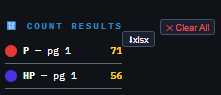
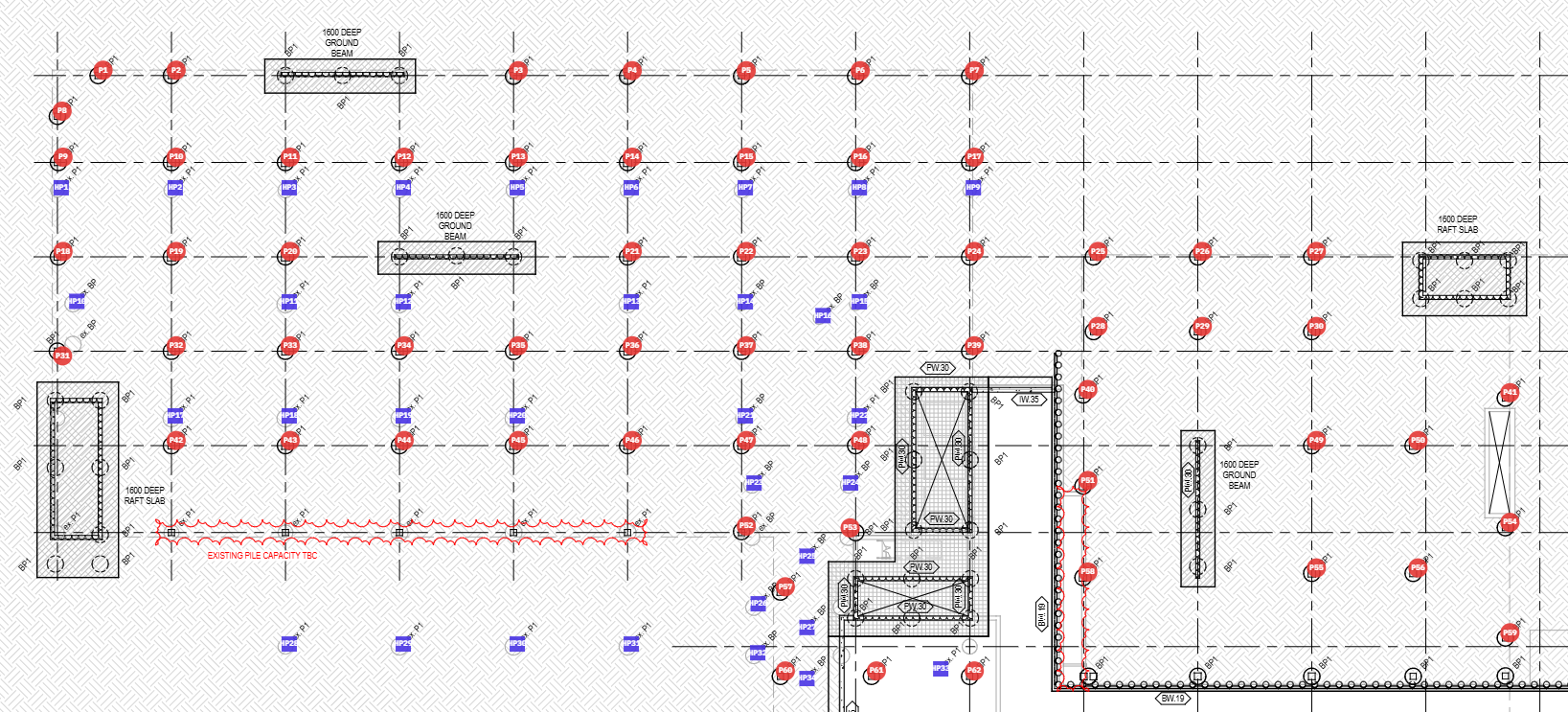
MarkupPro drawing view showing counted pile locations marked P1 through P62 in red and HP locations in blue, with structural gridlines and details.MarkupPro Count Results panel: P – pg 1: 71; HP – pg 1: 56.
More work. Less rework.

Practical tools that remove busywork.

Beyond collaboration and document control, MarkupPro helps you work with the drawing itself—without breaking your flow to repeat routine tasks elsewhere.

↔

Precision measurements Essential · Pro

Use global or local scales. Bind measurements to scale or use custom text, then reposition and style measurement labels to suit the drawing.

⌁

CAD-style markup tools Essential

Draw lines to specified lengths and angles, choose line styles and hatch enclosed shapes for controlled, accurate markups.

▤

Extract text and tables Essential · Pro

Extract text for reuse in MarkupPro or other applications, and export extracted tables to Excel instead of manually retyping data.

▧

Flexible page management Essential

Add or remove pages, insert documents and duplicate a complete page—with or without its markups—where you need it.

↗

Hyperlinks that connect context Essential

Link related information so reviewers can navigate between relevant references without losing their place.

◷

Revision and response filters Essential

Bring the relevant annotations into focus by filtering to a specific revision, author or response status.

Any platform. Any device.
Zero friction.

MarkupPro is engineered to run wherever your team is — on site, in the office, or on the go. No IT department required.

Windows
App + Browser
macOS
App + Browser
Chrome OS
Browser
iPad / iOS
Browser
Android
Browser

Web App — Any Device

Open your browser and you're ready. MarkupPro runs natively on any device — smartphones, tablets, laptops, and desktop workstations. No plugins, no Java, no ActiveX. If it has a modern browser, it works.

Chrome Edge Safari Firefox

Desktop App — One File Install

Prefer a native feel? Download a single lightweight file for Windows or macOS from our site — no installer wizard, no admin rights needed. Double-click and go. The same full MarkupPro experience runs locally on your machine, with automatic updates delivered silently in the background.

Windows macOS

Business Branding — Always On

Set your business name, address, website, email, and phone once. MarkupPro automatically populates these into every shop drawing revision stamp across your entire team. Update once — all users see the change immediately. Standard shop drawing notes are also centralised, so your team always works from the same approved set.

Professional

Everything your team needs
to mark up with confidence

All tools run in your browser. Annotations embed directly into the PDF — no proprietary project files.

Streamlined Drawing Review

A guided review workflow that takes drawings from distribution through markup to sign-off — faster cycles, fewer missed comments.

Live

Ownership, Discipline & Role-Based Annotations

Every markup is tied to its author, discipline, and role. Documented revisions show exactly who approved what, and when.

Live

Offline & Cloud Collaboration

Work online or offline without missing a beat. Offline responses are automatically consolidated back into the master document once you reconnect.

Live

Annotation & Change Log Lists

Every markup and edit is captured in a structured, exportable log — searchable, filterable, and always in sync with the drawing.

Live

Audit History & Visual Status

Track responses, acceptances, rejections, and comments by revision and by user, with on-page visual status indicators for at-a-glance review.

Live

Secure Document Sharing

Share drawings with permission-controlled access, so reviewers, contractors, and clients see exactly what they should — nothing more.

Live

Team Management

Invite, organise, and manage reviewers and approvers across projects, with centralised control over access and licences.

Live

Business Branding & Complex Stamps

Set your business name, logo, address, website, email, phone, fonts, and colours once — applied automatically across markups and complex stamps such as shop drawings, for every user in your business.

Live

Markup Revisions & Document Status

Manage revision and drawing numbering, document status, and preferred legal statements — kept consistent across every submission.

Live

Advanced Review Tools (Professional)

Count Similar Items, overlay comparison, and automatic PDF document comparison for fast, accurate revision checking.

Professional

Drawing Scales & Measurement

Set drawing scales locally or globally to measure length, angle, area, and perimeter — including single-click dynamic area and perimeter measurement.

Live

Professional Annotation Toolkit

Pen, highlighter, lines, polylines, polygons, arrows, rectangles, circles, rich-text sticky notes, and hyperlinks. Group, ungroup, mirror, and rotate objects; add or remove pages and documents; apply line styles and area hatch patterns — prioritised to match your business and client demands.

Live
Less chasing. More control.

Give your team a clearer way to review, respond, count and issue documents.

Try MarkupPro free →
Up and running today

From sign-up to your first resolved markup.

No installer wizard, no IT ticket. Start in your browser, or use the one-file desktop app for Windows or macOS.

  1. Create your account. Start the 14-day full-access trial (no credit card) or a free reviewer account.
  2. Open a drawing and invite reviewers. They can respond on a free reviewer account.
  3. Review, count and issue. Responses consolidate in one view and annotations stay in the PDF.
MarkupPro overviewVIDEO

Seat price scales with your team

One formula: more seats, lower unit cost. No tier cliffs. All prices shown in $, excl. Sales Tax.

Free, forever
Free (Reviewer)
$0 /seat
No credit card · no expiry · limited toolset
  • Real-time collaboration
  • Offline collaboration
  • PDF viewing
  • Annotation Discussions & Responses
  • Business Document Stamp
  • Document-Controlled Drawing Submittals
  • Annotation Ownership & Access Control
  • Flexible Plan Upgrades
Individual
Professional
Monthly Annual
— /seat/yr
excl. Sales Tax · 1 seat
  • Everything in Essential, plus
  • Real-Time Collaboration Management
  • Multi-Document Workspace
  • Drawing Package Comparison
  • PDF Table Extraction & Excel Export
  • Advanced Count Tool
  • Local Units & Scale Management
  • Area & Perimeter Measurement
  • Dynamic Area Measurement
  • Area Hatch Patterns
  • Angle Lock
Individual
Lifetime (Limited Seats)
99 of 100 remaining
-
excl. Sales Tax · 1 seat
  • Everything in Professional, plus
  • Lifetime Access to Future MarkupPro Releases
  • Preferred Access to the Growing Pariona Design Ecosystem
  • Exclusive Member Pricing on Future Pariona Design Modules
  • Priority Access to Newly Released Design Modules

Need multiple seats for your team? See Business pricing.

What's included in each plan

Every feature, clearly mapped across all three licence levels.

Feature Free Reviewer Essentials Professional
Business Management
Enterprise Administration ✓✓✓
Single Sign-On (SSO) ✓✓✓
User & License Management ✓✓
Business Branding ✓✓
Manage Business Standard Templates✓✓
Manage Revision Policies ✓✓✓
Collaboration
Annotation Monitoring and Responding✓✓✓
Offline Collaboration✓✓
Review Consolidation ✓✓
Real-Time Collaboration ✓
Document Management
PDF Management ✓✓
Page Management ✓✓
Drawing Revisions✓✓
Drawing Submittals✓✓
Multi-Document Workspace✓
Markup & Drafting
Drafting Tools ✓✓✓
Object Ownership✓✓✓
Text & Notes ✓✓✓
Advanced Object Operations ✓✓✓
Object Editing✓✓✓
Stamps ✓✓
Hatch Patterns✓
Drawing Scale Management
Global Scale & Unit Management✓✓
Local Scale & Unit Management✓
Measurement
Length✓✓
Angle✓✓
Area✓
Perimeter✓
Dynamic Area Measurement✓
Review & Automation
Overlay Comparison✓✓
OCR / Text Extraction✓✓
Markup Reports✓✓
Excel Export✓✓
Table Extraction✓
Drawing Comparison✓
Count Tool✓
Integrations
Pariona OS API ✓✓✓
Procore (Not Available)✓
Autodesk Construction Cloud (Not Available)✓

MarkupPro is one piece of
a complete construction platform

By 2030, Pariona will provide a comprehensive, end-to-end ecosystem for the construction industry, seamlessly integrating project planning, multi-disciplinary design, and certification with real-time construction and asset management.

Explore the Full Pariona OS

Where MarkupPro is headed

As part of the Pariona Construction OS, MarkupPro grows with the platform.

Core annotation & measurement suite Live

Full drawing markup, 14 line styles, shop drawing stamps, revision clouds, multi-page PDF management, export.

Count tool + Hatch patterns + Drawing comparison Live

Included in Lifetime deal. Count items, compare revision packages, and apply engineering hatch fills.

Real-time collaboration sessions Live

Multiple engineers mark up the same drawing simultaneously — equivalent to Bluebeam Studio Sessions.

Submittal workflow register Live

Track shop drawing submittals from receipt through review to return, with status history and notification.

Full Pariona OS integration Under Construction

MarkupPro connects natively to Pariona's project management, BIM, tendering, and asset modules — no third-party API needed.

Questions before you start

Straight answers on licences and costs.

Do I need a credit card to start?

No. The 14-day full-access trial needs no credit card, and free reviewer accounts are free with no expiry.

Do the people I invite need a paid licence?

No. Reviewers you invite can use a free reviewer account to view PDFs, join annotation discussions and respond to markups. You only pay for the seats that need the full toolset.

How does seat-based pricing work?

Price per seat falls as you add seats, with no tier cliffs. Use the seat sliders on the Business tab to see your price and total live. For larger teams, contact us for a competitive volume price.

Monthly, annual or lifetime?

Each plan card has a Monthly/Annual toggle; annual works out cheaper per seat. Lifetime is a one-off purchase with a limited number of seats, including lifetime access to future MarkupPro releases.

What currency and tax apply?

Prices are shown in $ for your region and exclude Sales Tax.

Which devices does it run on?

Any modern browser (Chrome, Edge, Safari, Firefox) on Windows, macOS, Chrome OS, iPad/iOS and Android, plus a one-file desktop app for Windows and macOS.

Am I locked into a proprietary file format?

No. Annotations embed directly into the PDF, with no proprietary project files.

Can I get a walkthrough first?

Yes. Email nb@pariona.com for a quick, no-pressure walkthrough.

Start with your real work

Stop chasing. Start controlling.

Try the full workflow free for 14 days, or create a free reviewer account to respond to drawings others send you.

FREE REVIEWER

Review and respond

Free account with limited capabilities, ideal when another business invites you to collaborate on a document.

Create free account

Prefer a walkthrough? Email nb@pariona.com · Already registered? Sign in